Keycaps for Mechanical Keyboards: Ultimate Guide for Enthusiasts
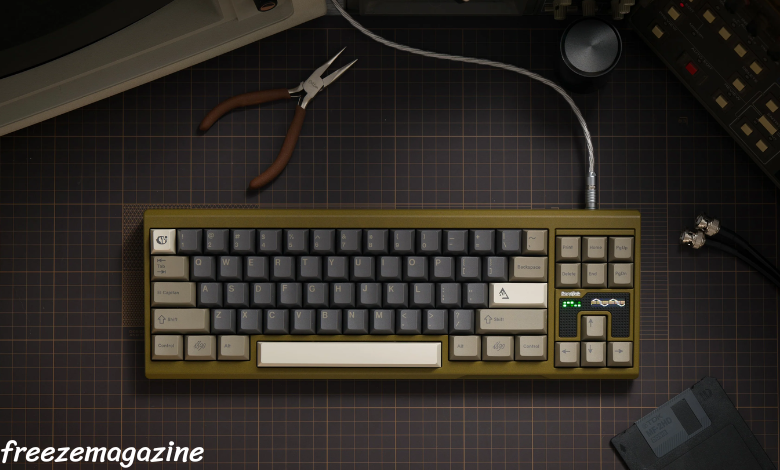
Mechanical keyboards have become a staple for gamers, writers, and tech enthusiasts alike. While much attention is given to switches, keycaps are equally important—they define the feel, sound, and aesthetics of your keyboard. In this guide, we’ll explore everything about keycaps for mechanical keyboards, from types and materials to choosing the right set for your setup.
What Are Keycaps and Why Do They Matter?
Keycaps are the removable covers on a keyboard’s switches. They serve as the interface between your fingers and the mechanical switch beneath. High-quality keycaps can improve typing comfort, reduce finger fatigue, and even impact the acoustic profile of your keyboard. According to a survey by Keyboard University, users reported up to a 20% improvement in typing satisfaction after upgrading to premium keycaps. Beyond functionality, keycaps also allow for personalization through colors, shapes, and artisan designs, turning a standard keyboard into a custom experience.
What Are the Different Types of Keycaps?
Keycaps are categorized based on shape, profile, and design. The most common profiles include:
- OEM: Standard profile found on most keyboards.
- Cherry: Shorter than OEM, favored for ergonomic typing.
- SA: Tall, spherical keycaps that are popular in custom builds.
- DSA: Uniform profile, suitable for uniform finger movement.
Each profile affects typing feel and comfort. For instance, Cherry profile keycaps often reduce finger strain during long typing sessions, while SA keycaps provide a more nostalgic and tactile experience for enthusiasts.
How Do Keycap Materials Affect Typing and Durability?
The material of your keycaps significantly impacts durability, feel, and sound. The most common materials include:
| Material | Pros | Cons | Common Use |
| ABS (Acrylonitrile Butadiene Styrene) | Affordable, smooth texture, vibrant colors | Prone to shine over time, less durable | Stock keyboards, entry-level sets |
| PBT (Polybutylene Terephthalate) | Durable, resists shine, textured feel | Limited colors, slightly rougher feel | High-end and enthusiast keyboards |
| POM (Polyoxymethylene) | Smooth, low friction, very durable | Expensive, less common | Specialized high-end keyboards |
Studies by Deskthority show that PBT keycaps maintain their texture up to 5 times longer than ABS under heavy daily use. For gamers and typists who spend hours on their keyboards, material choice can affect both performance and aesthetics.
How to Choose the Right Keycaps for Your Mechanical Keyboard?
Choosing the right keycaps involves considering compatibility, typing feel, aesthetics, and personal preference. Here are key factors:
- Switch Compatibility: Most keycaps fit MX-style switches, but always confirm stem type.
- Profile Preference: Decide if you prefer ergonomic profiles (Cherry) or uniform shapes (DSA).
- Material: ABS for vibrant colors, PBT for durability, POM for smooth typing.
- Legends: Consider dye-sublimated, double-shot, or laser-etched legends based on longevity and visibility.
- Layout: Ensure keycap sets match your keyboard layout (ANSI vs ISO, 60%, 75%, TKL, full-size).
For instance, a 75% mechanical keyboard often benefits from PBT Cherry-profile keycaps for a balance of comfort and durability. Enthusiasts also enjoy mixing artisan keys with standard sets for personalization.
Can Custom Keycaps Improve Your Typing Experience?
Custom keycaps can elevate typing comfort and keyboard aesthetics. For example, replacing smooth ABS caps with textured PBT ones can reduce finger slippage and increase typing accuracy. Gamers often prefer keycaps with sculpted profiles for frequently used keys (WASD or arrow keys). User reviews on tech forums consistently highlight improved satisfaction when switching from stock keycaps to high-quality custom sets. Additionally, custom keycaps allow users to express creativity, from themed sets to artisan sculpted designs, making the keyboard both functional and visually appealing.
Conclusion
Keycaps play a critical role in both the functionality and aesthetics of a mechanical keyboard. By understanding the different profiles, materials, and compatibility factors, you can select keycaps that enhance typing comfort, durability, and personal expression. Whether you’re a gamer, writer, or keyboard enthusiast, upgrading your keycaps is a cost-effective way to transform your typing experience. Explore high-quality keycaps for mechanical keyboards to find the perfect match for your setup.
FAQs
What is the difference between ABS and PBT keycaps?
ABS keycaps are smoother and more colorful but wear down faster, developing shine. PBT keycaps are more durable, resist shine, and offer a textured feel, making them ideal for heavy typing.
Are all keycaps compatible with every mechanical keyboard?
No. Most keycaps are designed for MX-style stems, but layouts (ANSI vs ISO) and keyboard size (60%, TKL, full-size) can affect compatibility. Always check keycap set specifications before purchase.
How can I clean and maintain my keycaps effectively?
Remove keycaps and wash them in mild soapy water, then dry completely. For regular maintenance, use a soft brush or compressed air to remove dust and debris. Avoid harsh chemicals to preserve material and legends.








Post Comment