Turn a Text Prompt Into Your Perfect Calm: A 5-Minute Music Break Powered by Musick AI
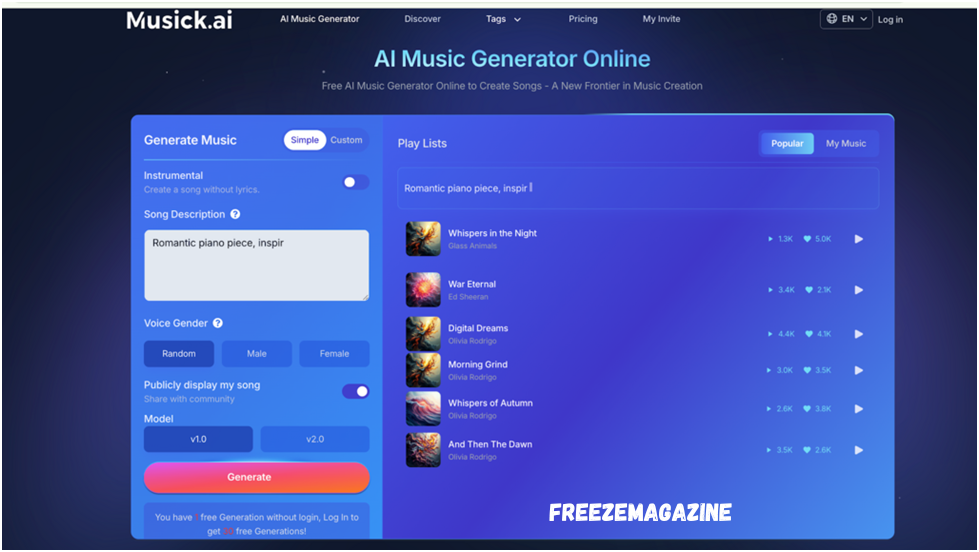
Some days, the noise in your head refuses to stop. Deadlines pile up, notifications keep buzzing, and the idea of unwinding feels far away. What if all it took was five minutes and a short text prompt to change the mood completely? Musick AI is a free AI Music Generator that lets anyone — no music background needed — create original, emotionally rich tracks in seconds. This article walks through exactly how to use it to take a real mental break.
I. Why Music Helps You De-Stress
Listening to music you connect with has a measurable effect on mood. The problem with ready-made playlists is that they’re built for no one in particular.
- A track that calms one person can feel slow and dull to another.
- You end up skipping songs instead of settling into them.
- The search itself becomes another small stressor.
Generating your own track — tuned to your exact mood — removes the friction entirely.
II. What Musick AI Actually Does
Musick AI is an online AI Music Maker that creates full-length, royalty-free songs based on your text input. It covers 15+ genres including Jazz, Classical, R&B, Pop, EDM, Blues, Reggae, and more.
1. Text-to-Song Generation
Type a description like “soft acoustic guitar, calm evening, no lyrics” and the tool builds the track around it. The more specific the prompt, the closer the result matches the mood.
2. Instrumental or Vocal Options
Users can choose between an instrumental track (no lyrics) or a full song with vocals. Vocalist gender preference can also be selected, giving more control over the final sound.
3. Genre and Style Selection
The Music Plaza feature lets users browse by genre category — useful when someone isn’t sure what they want but knows they need something calm, like Classical or Jazz.
III. How to Make a Stress-Relief Track in Under 5 Minutes
There’s no installation, no steep learning curve. The whole process lives in the browser.
1. Open the Generator
Go to Musick AI and find the Generate Music panel at the top of the page. No account is required for a first free generation.
2. Write a Mood-Based Prompt
Be specific. Instead of typing “relaxing music,” try something like: “slow jazz piano, late night, gentle rhythm, no rush.” The AI uses those cues — genre, mood, instruments — to shape the composition.
3. Choose Instrumental Mode
For stress relief, instrumental mode removes vocal distraction. Toggle that option before generating.
4. Hit Generate and Listen
The track is ready within seconds. If it doesn’t fully land, adjust a word or two in the prompt and regenerate. It takes less time than making a cup of coffee.
IV. Built-In Tools That Go Beyond Basic Generation
Musick AI includes several supporting tools that expand what’s possible, all accessible within the same interface.
1. AI Song Lyrics Generator
Input a genre and theme, and the tool produces original lyrics. Useful for anyone who wants to process emotions through songwriting rather than just listening.
2. AI Beat Producer
Write down melody notes and the Beat Producer structures them into a track. It’s a simple way to explore rhythm-based music that many people find grounding.
3. AI Rap Generator
Select a genre, build a music sheet, and generate rap-style tracks. Surprisingly effective for people who find high-energy music more cathartic than slow and ambient.
V. Who Actually Benefits From This
Musick AI is built for a wide range of users, not just musicians.
- Remote workers who need background AI Music that matches their focus level at different points in the day
- Students who study better with custom-paced instrumental tracks
- Content creators who want royalty-free music for YouTube, Instagram, TikTok, or podcasts without copyright concerns
- Educators who use it for classroom projects, including high school music students
- Anyone who needs a non-screen break during a long day
The music generated is royalty-free and cleared for commercial use, so there’s no need to worry about platform takedowns.
VI. Getting the Most Out of Your Prompt
The quality of a generated track depends heavily on how the prompt is written. A few practical tips:
1. Name the Genre First
Starting with the genre (Jazz, Classical, Acoustic Pop) sets the foundation and guides the AI faster than describing the mood alone.
2. Add Instruments and Tempo Cues
Phrases like “soft piano, slow tempo, minimal percussion” give the AI Song Maker concrete direction. Vague prompts produce generic results.
3. Describe the Feeling, Not the Story
Words like “melancholic,” “peaceful,” “bittersweet,” or “energizing” map directly to musical qualities. Think about how you want to feel in five minutes, and describe that.
Conclusion
A five-minute break doesn’t have to mean scrolling through your phone. With Musick AI, it can mean stepping into a piece of music made specifically for how you feel right now. The tool is fast, free to try, and flexible enough to serve a quiet wind-down session, a focused work block, or a creative project. Type a few words, generate a track, and actually rest.










Post Comment