Step-by-step: Make a Promo Video Using an AI Video Generator and AI Voice Generator
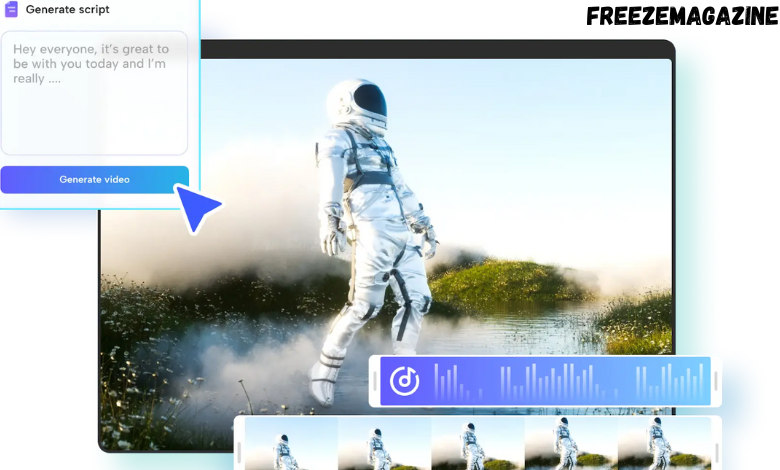
In today’s rapidly changing digital environment, it is no longer necessary to have expensive equipment or spend hours editing to create a professional-quality video for marketing, education, or social media. With the power of an ai video generator and an ai voice generator, anyone can create valuable, engaging, and polished videos in a fraction of the time. These tools are transforming the way content creators, marketers, and educators bring their ideas to life. This guide explains how to build a promo video step-by-step that captures attention and delivers results.
Understanding AI Video Generators
An AI video generator is a tool that uses artificial intelligence to automatically create videos from text, images, or scripts. Unlike traditional video editing, AI video generators manage scene transitions, animations, and timing automatically. They are particularly useful for promo videos, explainer content, and social media clips where speed and creativity are essential.
Modern AI video generators typically offer:
Scene creation based on your script automatically.
Smart suggestions for visuals and effects.
Access to stock footage and royalty-free images.
Customizable templates for marketing, social media, or educational videos.
With an AI video generator, anyone can achieve professional-level results without extensive training.
The Role of AI Voice Generators
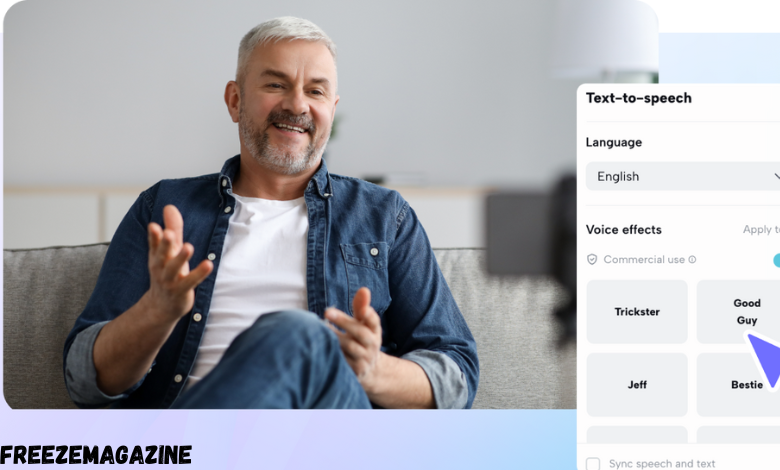
Alongside visuals, AI voice generators add realistic narration that enhances engagement and comprehension. Instead of hiring voice actors or manually recording audio, AI voice generators convert your text into natural-sounding speech in multiple languages, tones, and styles.
Key benefits include:
Consistent voice quality that aligns with brand messaging.
Ability to switch voices, accents, or emotions to suit video context.
Faster production compared to traditional voiceover methods.
Support for accessibility, such as narration for visually impaired viewers.
When combined with an AI video generator, an AI voice generator ensures that your promo video looks professional and sounds persuasive.
Step 1: Planning Your Promo Video
Every successful video begins with a clear plan. Identify the purpose of your promo video, your target audience, and the key message you want to convey. Write a concise script emphasizing engaging content that is easy to narrate. Include sections such as:
A captivating introduction
An explanation of the product, service, or idea
A compelling call-to-action
A well-organized script is the foundation for both your AI video generator and AI voice generator to produce the best results.
Step 2: Creating Visuals with an AI Video Generator
Once the script is ready, paste it into your preferred AI video generator. Most platforms allow you to:
Paste your script directly.
Choose video styles or templates.
Customize colors, fonts, and graphics.
Add transitions, effects, and background music.
The AI automatically generates video scenes based on your script. Review each scene, adjust visuals as needed, and ensure that the pacing matches your intended message.
Step 3: Adding Voiceover with an AI Voice Generator
Enter your script into an AI voice generator and select a voice that suits your brand tone. Most platforms allow you to:
Select different languages or accents.
Adjust speed, pitch, and emphasis.
Preview the generated audio before finalizing.
Once satisfied, download the audio file and integrate it with your AI-generated video. Ensure the narration aligns with visuals for a smooth viewing experience.
Step 4: Fine-Tuning and Editing
Even though AI handles most of the work, fine-tuning ensures your promo video looks and sounds natural. Pay attention to:
Voiceover timing and pacing with visuals.
Background music volume so it does not overpower narration.
Smooth transitions between scenes.
Text overlays or captions for clarity.
A short review cycle significantly improves video quality and overall viewer engagement.
Step 5: Exporting and Sharing Your Video
After final adjustments, export your promo video. Most AI video generators offer multiple resolution options suitable for YouTube, Instagram, or LinkedIn. Once exported, you can:
Upload directly to social media platforms.
Embed videos on websites or landing pages.
Share via email to reach your audience.
Using AI tools reduces production time and allows you to create and distribute professional videos much faster than traditional methods.
Conclusion
Creating a promo video using an AI video generator and an ai voice generator is now accessible to everyone, regardless of experience. Combining intelligent visuals with realistic voiceovers enables the production of high-quality content that captivates audiences, communicates messages effectively, and saves time.
Incorporating AI video and voice generators into your content workflow is no longer optional. It is a strategic approach for staying competitive in a digital-first world. Experiment with these tools today and see how quickly your promotional ideas can be transformed into professional-quality videos.
FAQs
What is the best way to select an AI video generator?
Choose a platform that fits your video style, offers customization options, and provides access to stock footage and audio. Free trials and user reviews can help find the best match.
Can AI voice generators create multiple voices in one video?
Yes. Most AI voice generators allow you to switch voices or accents within the same project, which is useful for multi-character narration or emphasizing different sections.
Are AI-generated videos suitable for professional marketing campaigns?
Absolutely. When used thoughtfully, AI-generated videos can match traditional production quality while saving time and resources.
Can AI-generated videos be edited after creation?
Yes. Most AI video generators allow post-production edits, including scene adjustments, overlays, or adding new voiceovers.
Do AI voice generators support multiple languages?
Yes. Many platforms support multilingual narration, allowing you to reach global audiences with natural-sounding speech.






Post Comment